Parsing markdown to create a mindmap
I was requested to investigate importing a markdown mindmap into my MindMap app. The app uses the MindMapView library for the display. There is a commonmark library that I have used in other apps to handle markdown, so I investigated if it is possible to use it for this.
The library provides an AbstractVisitor which you may use to visit
the tree of nodes generated by the parser. Because at least one
implementation of MarkMap uses YAML front matter to define the
title/root node there is a YamlFrontMatterExtension and a
YamlFrontMatterVisitor to deal with that.
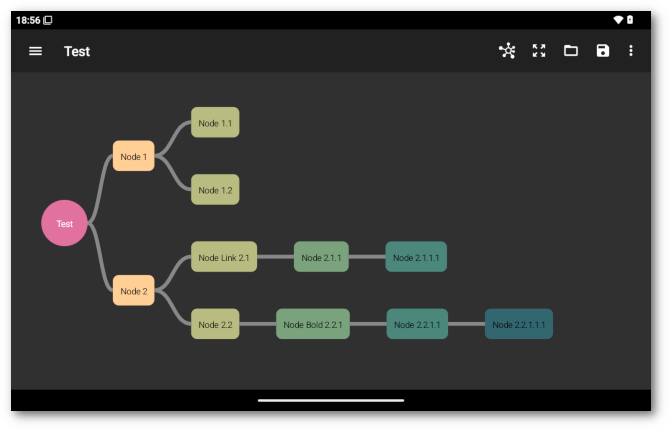
So you start off with something like this:
---
title: Test
---
## Node 1
- Node 1.1
- Node 1.2
## Node 2
- Node [Link](https://example.org) 2.1
  - Node 2.1.1
    - Node 2.1.1.1
### Node 2.2
#### Node **Bold** 2.2.1
##### Node 2.2.1.1
###### Node 2.2.1.1.1
And you get this:
First, read the markdown and give it to the commonmark parser,
including the YamlFrontMatterExtension.
        // Get the text
        StringBuilder text = new StringBuilder();
        try (BufferedReader reader = new BufferedReader(new InputStreamReader
               (getContentResolver().openInputStream(uri))))
        {
            String line;
            while ((line = reader.readLine()) != null)
            {
                text.append(line);
                text.append(System.getProperty("line.separator"));
            }

            // Use commonmark
            List<Extension> extensions =
                List.of(YamlFrontMatterExtension.create());
            Parser parser = Parser.builder().extensions(extensions).build();
            Node document = parser.parse(text.toString());
The document contains a tree of commonmark nodes which can be navigated using the API. Create a new MindMapView tree and initialise the mindmap view.
            // New tree
            tree = new Tree<>(this);
            mindMapView.setTree(tree);
            mindMapView.initialize();
Create a list to keep track of nodes and handle YAML front matter if it exists. The root node must be replaced to change the description.
            List<String> nodeList = new ArrayList<>();
            document.accept(new YamlFrontMatterVisitor()
            {
                @Override
                public void visit(CustomNode custom)
                {
                    int level = 0;
                    YamlFrontMatterNode node = (YamlFrontMatterNode)custom;
                    if (TITLE.equals(node.getKey()))
                    {
                        NodeData<?> root = tree.getRootNode();
                        tree.updateNode(root.getId(),
                                        node.getValues().get(0),
                                        root.getChildren(),
                                        root.getPath().getCenterX(),
                                        root.getPath().getCenterY());
                        nodeList.add(level, root.getId());
                        name = node.getValues().get(0);
                        setTitle(name);
                    }
                }
            });
Handle header nodes, both H1 headers and others. Get the text first,
this makes assumptions about the structure of the commonmark node
tree.
            document.accept(new AbstractVisitor()
            {
                int level = 0;
                // Heading
                @Override
                public void visit(Heading heading)
                {
                    // Get content
                    StringBuilder content = new StringBuilder();
                    Node child = heading.getFirstChild();
                    while (child != null)
                    {
                        if (child instanceof Text)
                            content.append(((Text)child).getLiteral());

                        else if (child instanceof Emphasis ||
                                 child instanceof StrongEmphasis ||
                                 child instanceof Link)
                            content.append(((Text)child.getFirstChild())
                                           .getLiteral());

                        child = child.getNext();
                    }
Handle a H1 header, similar to the above. The level variable is
used to keep track of header level and bullet/ordered list levels. Set
the name and the app title as above. The name is used when saving
the map.
                    // Title
                    if (heading.getLevel() == 1)
                    {
                        level = heading.getLevel() - 1;
                        NodeData<?> root = tree.getRootNode();
                        tree.updateNode(root.getId(),
                                        content.toString(),
                                        root.getChildren(),
                                        root.getPath().getCenterX(),
                                        root.getPath().getCenterY());
                        nodeList.add(level, root.getId());
                        name = content.toString();
                        setTitle(name);
                    }
Handle other header nodes. The call to super handles recursion. To
add a node you need an id, a parentId and the content.
                    else
                    {
                        level = heading.getLevel() - 1;
                        String id = UUID.randomUUID().toString();
                        tree.addNode(id,
                                     nodeList.get(level - 1),
                                     content.toString());
                        nodeList.add(level, id);
                    }

                    super.visit(heading);
                }
Handle a bullet list node. Check if the parent is a list item, if so increase the level for subsequent list items. Ordered list nodes are handled identically.
                // BulletList
                @Override
                public void visit(BulletList list)
                {
                    if (list.getParent() instanceof ListItem)
                        level++;

                    super.visit(list);
                }
Handle a list item. We don’t care what sort of list. Get the text
first, the parser adds a Paragraph node after list items, so a bit
of recursion.
                // ListItem
                @Override
                public void visit(ListItem item)
                {
                    // Get content
                    StringBuilder content = new StringBuilder();
                    Node child = item.getFirstChild();
                    while (child != null)
                    {
                        if (child instanceof Text)
                            content.append(((Text)child).getLiteral());

                        else if (child instanceof Emphasis ||
                                 child instanceof StrongEmphasis ||
                                 child instanceof Link)
                            content.append(((Text)child.getFirstChild())
                                           .getLiteral());

                        if (child instanceof Paragraph)
                            child = child.getFirstChild();

                        else
                            child = child.getNext();
                    }
Create a node. This code ignores all other possible content, like code blocks, inline code, etc.
                    // Node
                    String id = UUID.randomUUID().toString();
                    tree.addNode(id,
                                 nodeList.get(level - 1),
                                 content.toString());
                    nodeList.add(level, id);

                    super.visit(item);
                }
            });
Although there is no such thing as a markdown syntax error, irrational
markdown will break this code. It just generates an Exception and
gives up.
See Also
- Create a Word Grid
- Android Kotlin
- Android Word Count
- Derive Edit Position from Markdown
- Markdown OpenStreetMap Maps